
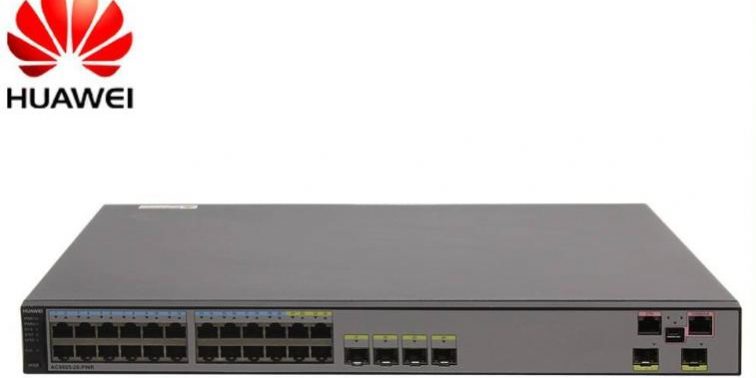
Console ?? ??? ????? ??? ??, ???? ?? ? ?? ???? ??? Console ?? ??? ????? ??? ? ????:
telnet?? ???? ? ?? ?? ???:
- STelnet/Telnet?? ???? ????? ??? Console ?? ??? ???? ??
? ??? ?? ??? ???? STelnet/Telnet ??? ???? ??? ??? ??? ?? ????. ??? ??? ??? ? ?? ??? STelnet?? ??? ????? Console ?? ????? ???? ??? ?? ???. ???? STelnet ???? ???? ???? ?, ?? ??? ?? ??????.
a. ??? ??? ?????? ?? ??? ???? ???? ????? Huawei@123? ??? ?? ??, ??? ??? ????.
[HUAWEI] user-interface console 0
[HUAWEI-ui-console0] authentication-mode password
[HUAWEI-ui-console0] set authentication password cipher Huawei@123
[HUAWEI-ui-console0] return
b. ??? ??? ?????? ?? ??? AAA ???? ??? ??? admin123, ????? Huawei@123? ??? ?? ??, ??? ??? ????.
[HUAWEI] user-interface console 0
[HUAWEI-ui-console0] authentication-mode aaa
[HUAWEI-ui-console0] quit
[HUAWEI] aaa
[HUAWEI-aaa] local-user admin123 password irreversible-cipher Huawei@123
[HUAWEI-aaa] local-user admin123 service-type terminal
[HUAWEI-aaa] return
telnet?? ???? ? ?? ?? console ???? ?? ??:
BootROM? ?? Console ?? ??? ???? ??
???? BootROM? Console ?? ??? ????? ???? ??? ?????. ???? ??? ?? ? Console ?? ??? ????? ??? ?? ??? ??? ? ????. ?? ??? ?? ??????.
Console ??? ???? ???? ???? ??????. ??? ?? ?? ??? ???? ?? ??? “Ctrl+B”? ??? BootROM ????? ???? BootROM ? ??? ?????.
???? ??? ?? ??:
Press Ctrl+B to enter boot menu … 1
Password: //BootROM ???? ?? (admin@huawei.com)
BIOS Menu (Version: 314)
- Boot with default mode
- Enter serial submenu
- Enter startup submenu
- Enter ethernet submenu
- Enter file system submenu
- Modify BOOTROM password
- Clear password for console user
- Config HigMem to Flash Flag
- Reboot
(Press CTRL+E to enter Diag menu)
Enter your choice(1-9): 7
Caution: Clear password for console user? Yes(y) or No(n): y
Clear password for console user successfully.
Choose “1.Boot with default mode”, then set a new password by console command line.
Caution: Do not reboot or power off the device, otherwise this operation will not take effect.
BIOS Menu (Version: 314)
- Boot with default mode
- Enter serial submenu
- Enter startup submenu
- Enter ethernet submenu
- Enter file system submenu
- Modify BOOTROM password
- Clear password for console user
- Config HigMem to Flash Flag
- Reboot
(Press CTRL+E to enter Diag menu)
Enter your choice(1-9): 1
??? ????? ??? 1? ???? ?? 9? ????? ? ???. ??? 7? ??? ??? ????? ?? ??? ???? ???? ??? ???? ?? ?????. 1? ???? ???? ?? ??? ?????? ???? ? ???, ? ?? ????? ??? ? ????
<AC6003>sys
[AC6003]user-interface console 0
[AC6003-ui-console0]authentication-mode password
[AC6003-ui-console0]set authentication password cipher
Info: A plain text password is a string of 8 to 16 case-sensitive characters and must be a combination of at least two of the following: uppercase letters A to Z, lowercase letters a to z, digits, and special characters (including spaces and the following :`~!@#$%^&*()-_=+|[{}];:'”,<.>/?). A cipher text password contains 68 characters.
New Password:
Confirm New Password:
[AC6003-ui-console0]
[AC6003-ui-console0]ret
<AC6003>sa
The current configuration will be written to the device.
Are you sure to continue? (y/n)[n]:y
It will take several minutes to save configuration file, please wait……..
Configuration file has been saved successfully
Note: The configuration file will take effect after being activated
<AC6003>
???? ???? ??? ?????.
??? ??? ?? ??:
Press Ctrl+B or Ctrl+E to enter BootROM menu … 2
password: //BootROM ???? ??
??:
??? ???? ?? ??? ??? “Ctrl+E”? ???? BootROM ? ??? ???? ?? ?????, ?? ??? ??? ?? ??????.
??? ???? V100R006C05 ?? ???? BootROM ?? ????? huawei??, V100R006C05 ? ?? ????? ?? ????? Admin@huawei.com???.
???? ???? V100R006C00 ?? ???? BootROM ?? ????? 9300??, V100R006C00 ? ?? ????? ?? ????? Admin@huawei.com???.
b. BootROM ? ???? “Clear password for console user”? ???? Console ?? ??? ????? ?????.
c. ???? ??? ?? BootROM ? ???? “Boot with default mode”? ???? ??? ?????.
d. ??? ??? ???? Console ??? ???? ? ??? ???? ???, ??? ? ??? ??? ?? ?? ????? ?????.
e. ???? ???? ? ???? ??? ?? Console ??? ?????? ?? ?? ? ????? ??? ? ????.
??:
http://support.huawei.com/enterprise/pages/doc/subfile/docDetail.jsp?contentId=DOC1000030801&partNo=10052#dc_wlan_password_0004
http://support.huawei.com/huaweiconnect/enterprise/thread-337263.html
https://wenku.www.jydamingsi.com/view/b2d3cf249ec3d5bbfc0a74bd.html
http://support.huawei.com/ehedex/pages/DOC1000055019DZD0928P/05/DOC1000055019DZD0928P/05/resources/dc/dc_s_troubleshooting_basic_0010.html?ft=0&id=DZD0928P_05_10115


