
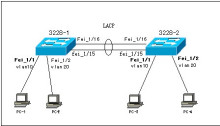
Cisco and Huawei Switch Link Aggregation (LACP) Configuration Examples
Cisco G0/25—Huawei G0/0/1 Cisco G0/27—Huawei G0/0/2 Huawei switches support two link aggregation modes: manual and lacp-static. If no configuration is applied, the switch defaults to manual, so you must manually change the mode to lacp-static. This is important, otherwise it cannot successfully negotiate LACP with a Cisco switch. Huawei Switch #interface Eth-Trunk1 port link-type trunk port trunk allow-pass vlan 2 to 4094 mode lacp-static //Change the link aggregation mode max active-linknumber 2 //Set the maximum number of active links to
How to Configure Link Aggregation on a Huawei S5700 Switch
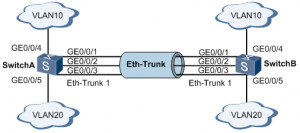
Example: Configuring Link Aggregation in Manual Load Balancing Mode Networking Requirements As shown in Figure 1, SwitchA and SwitchB are each connected to VLAN 10 and VLAN 20 networks through Ethernet links, and a large volume of data traffic is exchanged between SwitchA and SwitchB. The user wants to provide greater link bandwidth between SwitchA and SwitchB so that devices in the same VLAN can communicate with each other. The user also wants a certain degree of redundancy to ensure
Cisco Switch DHCP Snooping Explained with Examples
I. Common Issues with Deploying DHCP Services Setting up a DHCP server allows network parameters such as IP addresses, subnet masks, default gateways, and DNS servers to be assigned automatically to clients, which simplifies network configuration and improves management efficiency. However, there are some problems in the management of DHCP services, the most common of which are: · Rogue DHCP servers · DoS attacks against the DHCP server, such as DHCP exhaustion attacks · Users assigning IP addresses arbitrarily, causing
Data Encryption Error When Using Windows 10 Remote Desktop to Connect to Another Computer
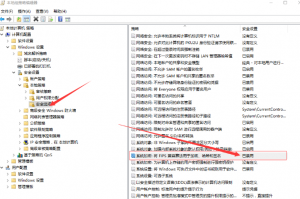
Windows 10: When using Remote Desktop to connect to another computer, the following error occurs: “Because of an error in data encryption, this session will end. Please try connecting to the remote computer again.” This could be due to CredSSP encryption oracle remediation. HKEY_LOCAL_MACHINE\SOFTWARE\Microsoft\MSLicensing Solution 1: Type gpedit.msc in Run to open the Local Group Policy Editor. Go to Group Policy > Computer Configuration > Windows Settings > Security Settings > Security Options > System cryptography: Use FIPS compliant algorithms

Windows 2016 Server Security Configuration and Hardening
System Update Configuration Change the Windows Update Server If the default Windows Update server is slow, or if you use an Alibaba Cloud or Tencent Cloud server, you can switch to a different Windows Update server. Right-click the Start menu icon, select “Run,” and enter gpedit.msc. Navigate to “Computer Configuration” – “Administrative Templates” – “Windows Components” – “Windows Update,” then double-click “Specify intranet Microsoft update service location”: Select?Enabled, then configure the intranet update service for detecting updates and the statistics

Windows Server 2016: Enable Photo Viewing and Preview Features
By default, Windows Server 2016 cannot view or preview images. Siwenlide shows you how to enable it using the following steps: 1. Press Win+R to open the Run dialog, type regedit and press Enter to open the Registry Editor. 2. In the Registry Editor, navigate to HKEY_LOCAL_MACHINE\SOFTWARE\Microsoft\Windows Photo Viewer\Capabilities\FileAssociations 3. In the right pane, create a new string value. Create two entries, .jpg and .png, both with the value PhotoViewer.FileAssoc.Tiff You can then view .jpg

How to Reset the Password on a Huawei AC Device
If you forget the Console port login password, you can set a new Console port login password in either of the following two ways: Resetting the password when Telnet login is available: Log in to the switch through STelnet/Telnet to set a new Console port login password This method requires that you have an STelnet/Telnet account with administrator rights. The command lines and command output below use the case of logging in to the device through STelnet to change
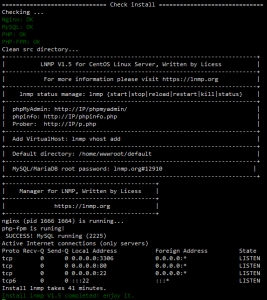
LNMP One-Click Installer
Installation Requirements: CentOS/RHEL/Fedora/Debian/Ubuntu/Raspbian/Deepin/Aliyun/Amazon/Mint Linux distributions At least 5GB of free disk space; at least 9GB free for MySQL 5.7 or MariaDB 10 At least 128MB of RAM (for 128MB low-memory VPS: Xen requires SWAP; OpenVZ requires at least 128MB of vSWAP or burstable memory). Note: do not use a 64-bit system on low-memory machines! Installing MySQL 5.6 or 5.7, or MariaDB 10 requires at least 1GB of RAM; higher versions require at least 2GB of RAM!. Installing PHP 7 or
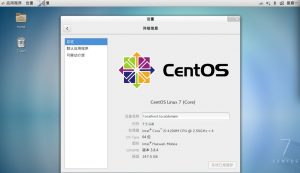
Disable the Firewall and SELinux on CentOS7
Firewall (firewalld) Temporarily stop the firewall systemctl stop firewalld Disable the firewall at startup systemctl disable firewalld Temporarily start the firewall systemctl start firewalld Enable the firewall at startup systemctl enable?firewalld Check the firewall status systemctl status firewalld END SELinux 1 Temporarily disable SELinux enforcement setenforce 0 2 Temporarily enable SELinux enforcement setenforce 1 3 Disable SELinux at startup Edit the /etc/selinux/config file and set SELINUX to disabled, as shown below. SELinux will be disabled on the next boot. 4
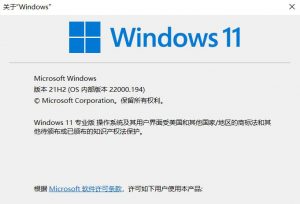
How to Install the General Availability Release of Win11 On October 5, 2021, Microsoft released Windows 11 to general availability, bringing a host of new features; Windows 10 users who meet the hardware requirements can now upgrade. Win11 Why the upgrade matters and what’s new in the system Support for Android apps is coming, and is expected to arrive within a few months An all-new UI and sound design make the system more modern, cleaner, and more attractive, with a